Chapter-wise practice and tests
Every subject is broken into chapters and sub-topics, so you can test exactly what you studied this week and see which chapters are done.
Use it when You've just finished a chapter in class and want focused practice on it alone — not a full mock that mixes everything.
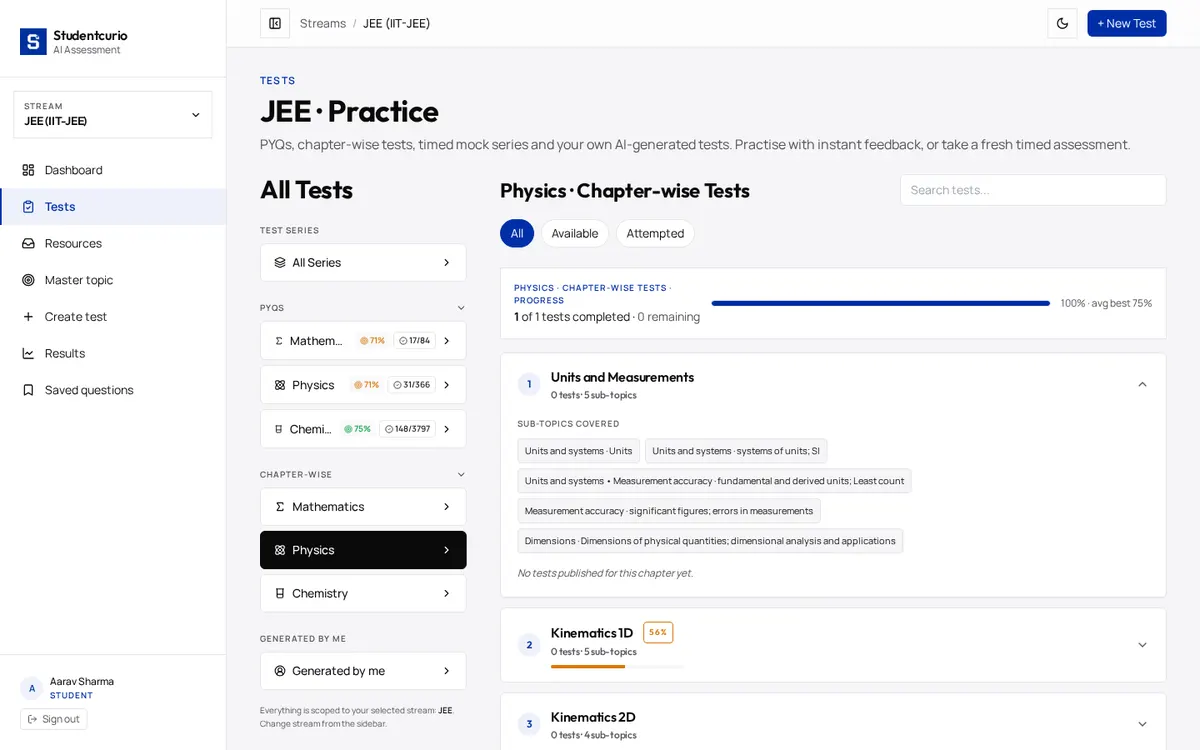
How it works
- Open Tests → Chapter-wise and choose a subject.
- Expand a chapter to see the sub-topics it covers and the tests published for it.
- Start a chapter test, or practise that chapter's PYQs with instant feedback.
- Filter by Available or Attempted and follow the progress bar as you complete chapters.
An example
Before a weekend, open Mathematics → Chapter-wise → Coordinate Geometry. Take the chapter test in assessment mode, then reattempt only the questions you missed in practice mode.
Good to know
- Not every chapter has an official test yet; chapters without one say so.
- Chapter tests are written by StudentCurio with AI assistance and checked before publishing; mistakes are still possible.
Try it on your own chapters
Free for now. Sign in with Google or email — no card needed.